When deploying generative AI models in production, achieving optimal performance isn’t just about raw speed—it’s about aligning compute with user experience while staying cost-effective. Whether you’re building chatbots, code assistants, RAG applications, or summarizers, you must tune your inference stack based on workload behavior, user expectations, and your cost-performance tradeoffs.
But let’s face it—finding the right inference configuration is hard. It involves juggling a ton of parameters—throughput, context length, sequence length, time-to-first-token (TTFT), idle user time, prefill and decode performance, end-to-end latency, and many more.
And if you set these wrong, the impact is real:
- Sluggish user experience
- Wasted GPU or CPU cycles
- Higher serving costs
- Poor scalability
At Bud Runtime, we’ve taken a new approach: Deployment Templates—a pre-tuned deployment settings to get the best performance and ROI without trial and error. Let’s dig into why this matters and how it works.
Why inference configuration is hard
In generative AI, inference performance isn’t just about maximizing tokens per second. Instead, it’s about maximizing goodput—useful tokens generated per unit time under real-world workload constraints—and doing so within your Service Level Objectives (SLOs).
Depending on your use case, these goals shift.
Human-facing: chat and assistants
Users expect snappy responses. But trying to generate tokens faster than a person can read is wasted effort. A typical human takes ~200ms to consciously process a response. So shaving your TTFT (Time to First Token) down from 220ms to 120ms may sound like a win—but in practice, it burns the computer without improving the experience.
For example, On Intel® Xeon® Platinum 8592V, the LLaMA 3.1 8B model delivers 120ms TTFT with 30 concurrent users. But increasing TTFT to 220ms doubles concurrency—with zero impact on UX.
| Concurrent Users | TTFT (in ms) | TPOT (in ms) | Total Throughput (in t/s) |
|---|---|---|---|
| 1 | ~ 63 | ~ 15.8 | ~ 16 |
| 30 | ~ 114 to 120 | ~ 8.8 | ~ 262 |
| 75 | ~ 217-227 | ~ 4.6 | ~ 344 |
Trying to be “fastest” leads to wasted cycles. Instead, we must match AI output speed to human read speed. That’s the sweet spot for chatbots and assistants.
Machine-facing: summarisation and batch NLP
Here, there’s no human in the loop. The goal is pure efficiency. The faster we can process and complete jobs, the better.
You want:
- Maximum concurrency
- Minimum end-to-end latency
- Best possible throughput
There’s no UX constraint, so go all-in on speed.
The trade-off: TTFT against throughput
Now consider this: TTFT and throughput are not independent. In fact, they often work against each other.
Here’s what we typically observe:
- Low TTFT → Great for perceived latency but reduces throughput.
- High throughput → Increases TTFT due to batching and queuing.
Developers new to deployment often pick one extreme—either pushing throughput for efficiency or squeezing TTFT for responsiveness.
But the best answer lies in between.
There’s a “green zone”—an optimal tradeoff where TTFT remains acceptable for your SLO while maximizing concurrency and system efficiency.
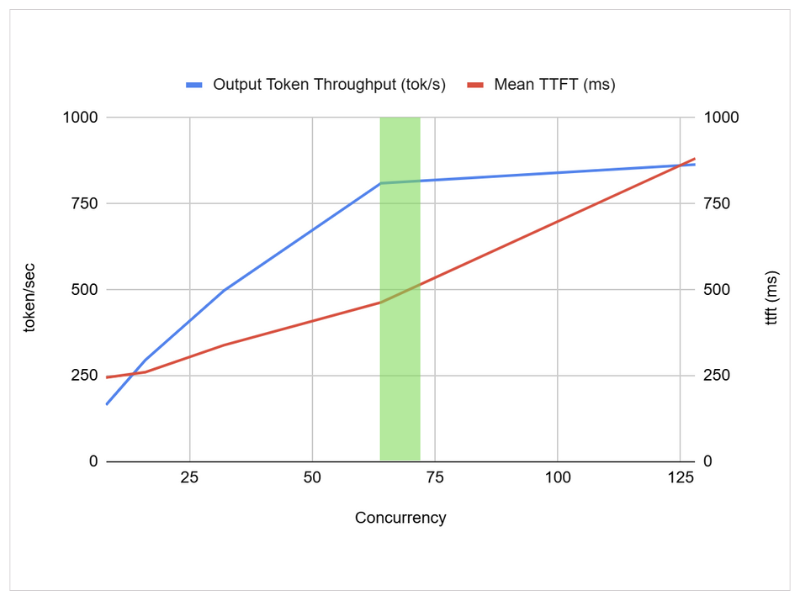
If you have a graph of TTFT vs throughput, that green area is what you want. But getting there is tough—especially when every use case behaves differently.
Deployment templates in Bud Runtime
Bud Runtime simplifies this mess with Deployment Templates.
These are pre-configured inference setups tailored to specific generative AI workloads like chat, RAG, summarization, code generation, entity extraction, and more.
Each template:
- Picks optimal values for key parameters
- Balances TTFT, throughput, concurrency, and latency
- Matches runtime behavior to expected usage patterns
Let’s see how Bud Runtime simplifies the whole process in the video below;
No need to memorize hardware behavior, tokenization quirks, or concurrency formulas.
Measured gains
Let’s look at actual performance uplifts.
| Use Case | Goodput Gain | SLO Precision |
|---|---|---|
| Chatbots | 2.0X – 3.14X | – |
| Code Completion | 3.2X | 1.5X tighter |
| Summarization | 4.48X | 10.2X tighter |
With just a template switch, you’re getting significantly better performance and better UX.
Ask Bud: automating SLO creation
We’re also introducing Ask Bud—a generative AI-powered agent for automating infrastructure deployment and tuning.
Using a simple chat interface, you can:
- Describe your workload
- Get optimal SLOs
- Auto-deploy with tuned configuration
- Ask questions like: “How can I serve 50 concurrent users under 300ms latency?” “What’s the best config for code generation with 16K context?”
Ask Bud builds on our deployment knowledge base and optimization rules so you don’t need to know the internals of speculative decoding, context windows, or concurrency—it handles everything.
Final thoughts
Tuning generative AI deployments used to require a PhD in inference. Today, with Bud Runtime Deployment Templates, you can get high-performance, cost-efficient, and user-optimized deployments—without deep expertise.
Whether you’re launching a chatbot, scaling a summarization pipeline, or experimenting with new LLMs, you now have the tools to get it right from day one. No more guessing. No more tweaking knobs blindly.
Just pick a template and go. And if you want to go even faster? Just Ask Bud.
Want to see it in action? Try Bud Runtime today and explore our open-source templates, runtime optimizations, and developer toolkit for generative AI deployment done right.