A few weeks ago, while working on implementing a guardrail engine, I found myself staring at a performance graph that didn’t make any sense. Guardrail actions, like input sanitization, policy enforcement, hallucination checks, bias mitigation, audit logging: each layer adds complexity and latency. Left unchecked, those extra hops can nudge your p95 from tolerable to untenable. At Bud, we recognized this trade‑off early on and chose to build our own guardrail engine, Bud Sentinel — the engine inside Bud SENTRY — from scratch. I’ve led that library’s development from day one, and my sole mission has been clear: drive down the guardrail‑induced latency to the absolute minimum so that our overall endpoint performance remains fast and fluid.
To hit that goal, I profiled each stage of the guardrail pipeline to pinpoint the highest-cost checks and performed rigorous validation against our accuracy benchmarks. Then we optimized everything: moved the entire codebase from Python to Rust, further improved model performance using Burn, and even reengineered our RegEx and fuzzy pattern matching from the ground up.
And yet, there it was—a glaring 24ms response time for a 32K token context.
Our initial architecture for Bud Sentinel followed industry best practices and incorporated several innovative components: SIMD-optimized pattern matching, a high-speed static embedding that balanced accuracy with low memory usage and latency, semantic classifiers built on top of this embedding, and efficient parallel processing pipelines. Yet, we were seeing a latency of 24ms for a 32K context length—something I found unacceptable.
So, I set out to find what’s causing the latency. Initially I suspected the embedding lookups and their calculations. However, a detailed profiling uncovered an unexpected culprit.
The overlooked problem: tokenizers are still slow
Tokenization — the part of the pipeline nobody profiles — was consuming 90% of that latency.
Tokenization is supposed to be the “solved” part of NLP pipelines. It’s just converting text to numbers, right? But the profiler doesn’t lie. Our HuggingFace tokenizer—widely considered one of the best—was taking over 20 milliseconds just to process the text.
Digging deeper, I found several issues:
- Memory allocations were happening all over the place
- The WordPiece algorithm was doing redundant work
- Unicode operations were particularly slow
- Normalization routines were more complex than necessary
What needed to change
Once I identified the issues—such as underoptimized implementations of the tokenization algorithm, memory overheads, and more—I did some research to figure out how to improve things. Here are the changes I made:
An optimized WordPiece implementation
The existing implementation of WordPiece algorithm was optimized for production and included built-in parallelism, but it wasn’t designed with the ultra-low overhead requirements we were targeting. So I refactored the WordPiece algorithm, implemented caching mechanisms, and resolved various optimization issues I had discovered. As a result, the tokenization process became significantly leaner, with substantial reductions in overhead—achieved without sacrificing accuracy.
The optimized implementation of the WordPiece tokenization algorithm delivered substantial performance improvements. These optimizations span the entire tokenization pipeline, including normalization, pre-tokenization, model tokenization, and post-processing.
The results
This custom tokenizer is 6.6X faster in terms of overall throughput, processing 26,901 tokens per second compared to 4,077 tokens per second with the standard implementation. Moreover, across a range of text lengths, our tokenizer consistently outperforms standard tokenizers, demonstrating speedups ranging from 7.3X to 9.8X. For instance, at 16,000 tokens, we achieved a 9.9X speedup, reducing latency from 14.1 ms to 1.4 ms.
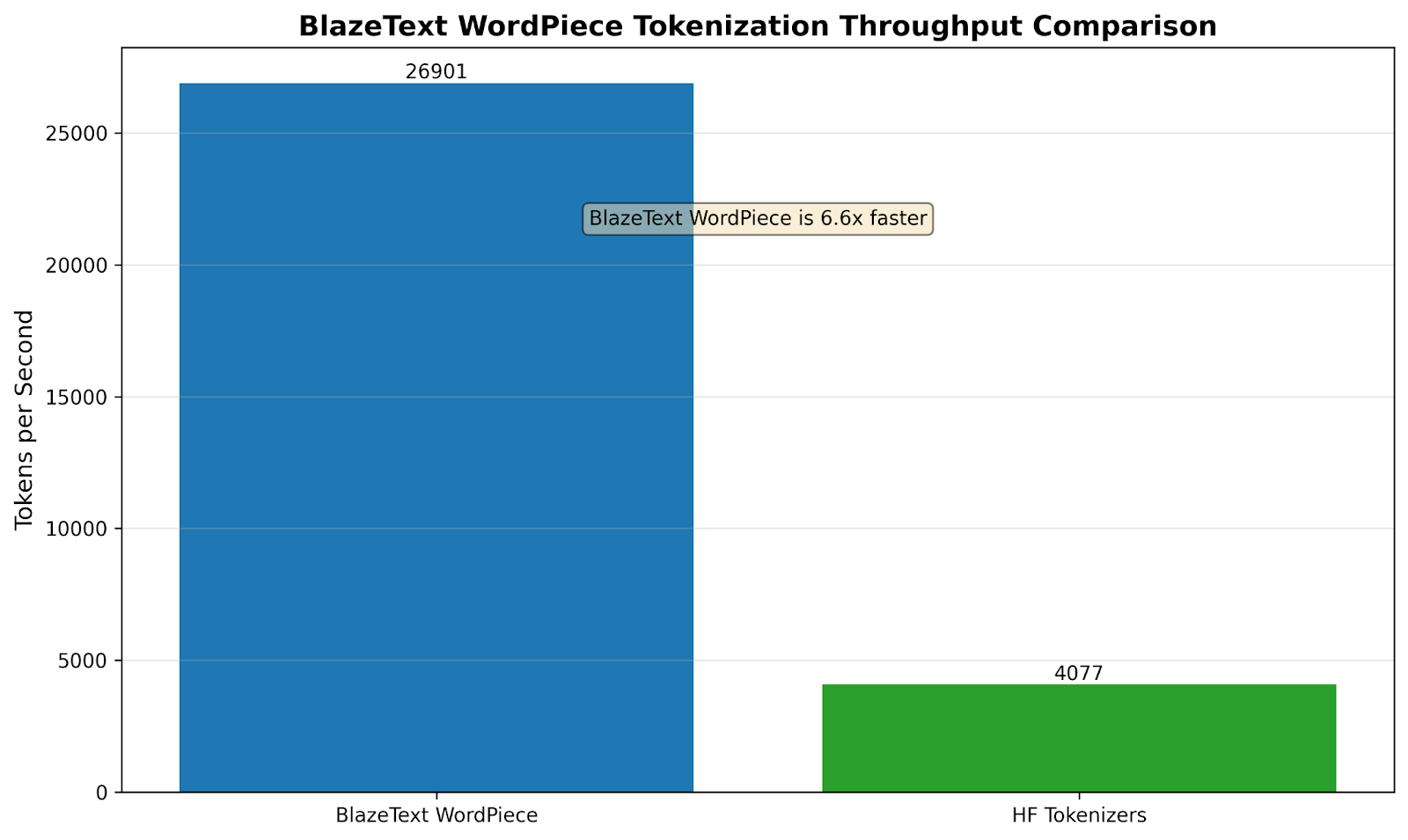
Chart above shows BlazeText WordPiece processes about 26,900 tokens/sec versus 4,100 tokens/sec for Hugging Face Tokenizers, delivering a ~6.6× higher throughput.
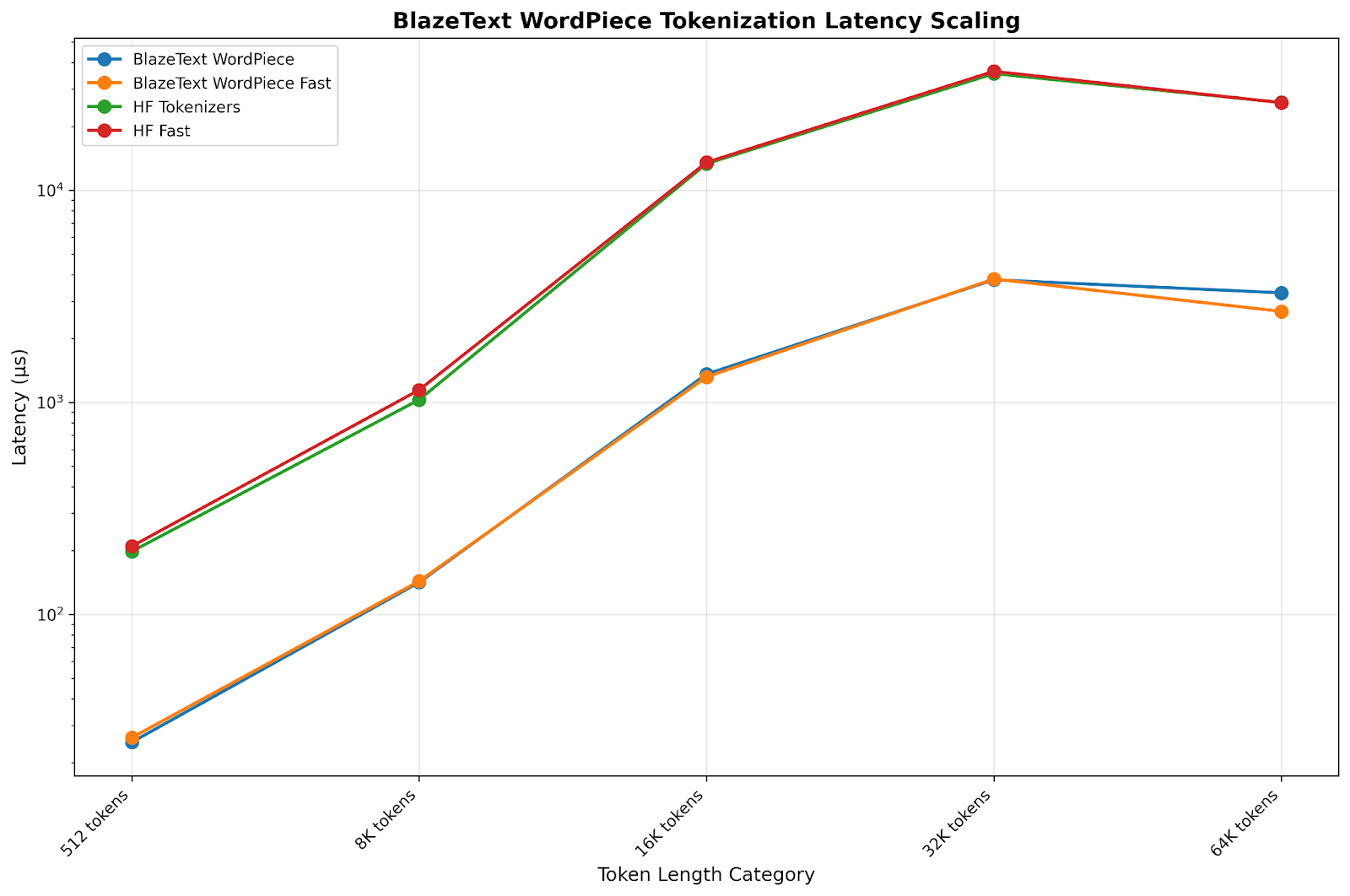
The chart above shows that tokenization latency grows roughly exponentially with sequence length for all methods, rising from tens of microseconds at 512 tokens to tens of milliseconds at 64K tokens. Across every sequence length, the “Fast” variants process inputs about 8–10X faster than their standard counterparts. Across all sequence lengths, BlazeText WordPiece Fast delivers the lowest latency, making it the best performer among the four methods.
These gains were achieved through a combination of techniques, including better parallelisation and batch processing, optimized lookups and fast paths for common use cases and low overhead caches for reducing redundant computations, and more efficient string handling.
And of course, there was still room for improvement. Optimized Unicode Character Classification
I found that, in existing implementations, every character was being classified through the same slow path, whether it was a simple ASCII letter or a complex Unicode symbol. This one-size-fits-all approach was costly.
To accelerate the tokenization process, I implemented an optimized Unicode character classification system. This approach uses fast paths for ASCII characters through bitmap lookups, optimized range checks for large Unicode blocks, binary searches for non-ASCII characters, and thread-local LRU caching for frequently accessed characters. These enhancements result in 1.8X to 32.4X speed improvements over existing implementations. ASCII operations are approximately 12X faster, and punctuation detection is about 32X faster. For example, checking if ‘a’ is alphabetic now takes a single array lookup instead of a complex Unicode table search.
I did two implementations: a default optimized version designed for primarily ASCII text, which is on average 10X faster, and a bitflags-based implementation optimized for Unicode-heavy text, which performs composite category checks significantly faster—achieving an average speedup of 12.7X.
Optimized Unicode Normalization The normalization process was thorough but inefficient, treating all text the same way regardless of its actual complexity. Unicode normalization ensures that text has a consistent representation, which is essential for accurate tokenization. So I implemented all four Unicode normalization forms—NFC, NFD, NFKC, and NFKD—with a strong emphasis on both speed and accuracy. The implementation incorporates ASCII fast paths, custom buffer management, optimized lookup tables, and zero-copy iterators.
The optimised normalization library is up to 3.4X faster than standard reference implementations. Specifically, for ASCII processing, it is 3.2X faster for short text and 3.4X faster for long text. For larger ASCII inputs (1KB and above), we achieve a 5.3X improvement in throughput.
Putting it together: BlazeText
The table below summarizes the key results from all the optimizations. Most importantly, I was able to reduce our guardrail library’s latency from 24ms to under 5ms for 32K-token contexts—finally hitting the target. (Of course, the pursuit of even lower latency continues…) I’ve packaged all these optimizations into a single library and named it BlazeText.
BlazeText library contains a refactored WordPiece algorithm, implemented caching mechanisms, and resolved aforementioned optimization issues. Using it the tokenization process became significantly leaner, with substantial reductions in overhead—achieved without sacrificing accuracy.
| Category | Metric | Improvement |
|---|---|---|
| Tokenization Performance | Throughput | Increased from 4,077 to 26,901 tokens/sec |
| Latency for 16,000 tokens | Dropped from 14.1ms to 1.4ms | |
| Performance across text lengths | 7× to 9× faster | |
| Character Classification | ASCII operations | 12× faster |
| Punctuation detection | 32× improvement | |
| Overall Unicode handling | 2× to 32× improvement (operation-dependent) | |
| Normalization Speed | Typical text | 3× faster |
| Larger documents | 5× better throughput |
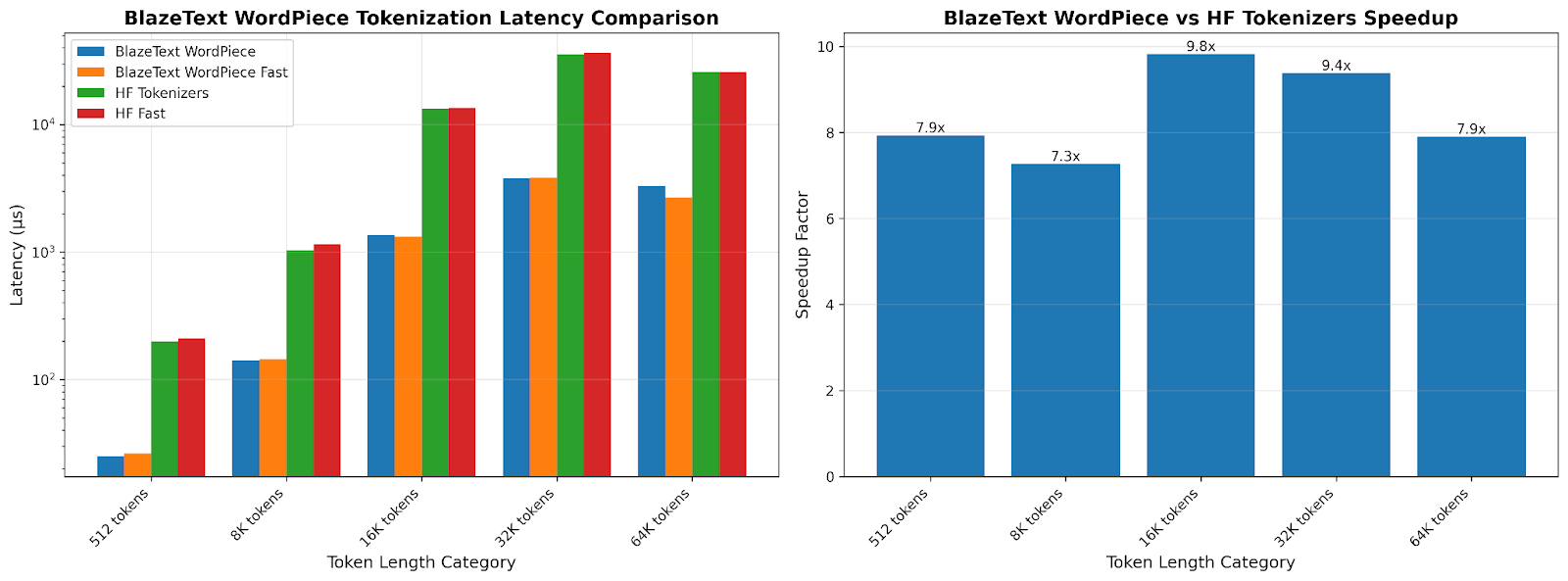
The charts above shows BlazeText WordPiece Fast cuts tokenization latency by roughly 7–9X compared to Hugging Face’s Fast tokenizer and similarly outpaces HF Tokenizers across all sequence lengths (from ~120 µs vs. 200 µs at 512 tokens to ~2.8 ms vs. 26 ms at 32K tokens). Peak speedup is at 16K tokens (≈9.8× faster), with consistent ~7.3–9.8× gains across the board.
Where else this applies
While I built BlazeText to solve a specific problem, the optimizations apply broadly to any system where tokenization matters:
Real-time Applications Chat systems, live translation, and interactive AI assistants all benefit from faster tokenization. When you’re trying to maintain a conversation, every millisecond counts.
High-throughput Processing If you’re processing millions of documents, a 10x speedup in tokenization can significantly reduce infrastructure costs and processing time.
Edge Deployment Faster tokenization means less CPU usage, which translates to better battery life and performance on mobile or embedded devices.
Streaming Systems For applications processing continuous text streams, efficient tokenization prevents bottlenecks and reduces latency.
Lessons learned
This project taught me a few things:
- Profile before optimizing. I would never have guessed tokenization was our bottleneck without measurement.
- Question assumptions. Just because something is widely used doesn’t mean it’s optimized for your use case.
- Understand your data. Most text is ASCII. Optimizing for the common case while handling the general case correctly yields huge wins.
- Small improvements compound. No single optimization gave us 10X. It was the combination of many 2X and 3X improvements.
The code still scales linearly with input length, the constant factor improvements make a real difference. Sometimes the biggest performance gains come from the places you least expect. In our case, it wasn’t the fancy ML models or complex algorithms that needed work. It was the humble tokenizer, quietly consuming 90% of our time budget.
Throughput and latency figures are measured on Bud’s own benchmark harness against HuggingFace Tokenizers and its Fast variant, over token-length categories from 512 to 64K. The headline 6.6× is overall throughput; per-length speedups run 7.3× to 9.8×, and the character-classification and normalization figures are measured separately, as the table above sets out.