As AI agents move into production, their costs grow in ways that are not always obvious. Bud AI Foundry already reduces that spend behind the scenes, caching answers so repeated requests never go back to the model provider, and trimming what gets sent to the model in the first place. The Cost Optimiser makes that work visible, and lets you decide how far it goes.
You will find it as a new Cost Optimiser tab on every deployment: go to Projects, open a project, then open any deployment. It reports what the deployment spent and what it saved, and offers four presets, from measuring only to maximum savings. On our test run, the recommended preset, Safe savings, cut model cost by about 45% with identical accuracy.
Where agent spend actually goes
A chatbot answers a question and stops. An agent loops: it calls a tool, reads the result, reasons, calls another tool, and on every turn it sends the model the whole conversation so far. Cost grows with the length of the session, not with the number of questions, and three things inflate it that rarely show up on a line item.
- The same request, again. Retried steps, repeated questions and parallel workers asking for the same thing each pay for a fresh model call.
- Tool output the model does not need. A grep, a log tail, a diff or a pretty-printed JSON response can run to thousands of tokens, and it is resent on every later turn of the session.
- A discount you pay to lose. Model providers charge less for the part of a request whose opening they have already seen. Agents routinely break that opening without meaning to, and pay full price for context the provider already holds.
The discount most agents throw away
Providers cache the key–value state of a request's opening, its prefix, and bill a repeated prefix at a fraction of the normal input rate. For an agent that resends a long system prompt, a tool list and a growing history on every turn, that discount should cover most of each request.
The catch is that the match is exact. The cache holds from the first byte up to the first byte that differs, and everything after that point is billed in full. Tools listed in a different order, JSON keys serialized in a different sequence, a tool result shortened on one turn and resent at full length on the next: each looks harmless, and each moves the point where the discount stops.
Four of the safe techniques below exist for one reason: to keep each turn's opening byte-identical to the last, so the provider's repeated-prefix discount keeps applying for the length of the session.
Four presets, from look-only to maximum
The Optimisations tab opens on four presets. They run from measuring only to cutting hard, and the right one depends on how sensitive your application is to a change in what the agent says.
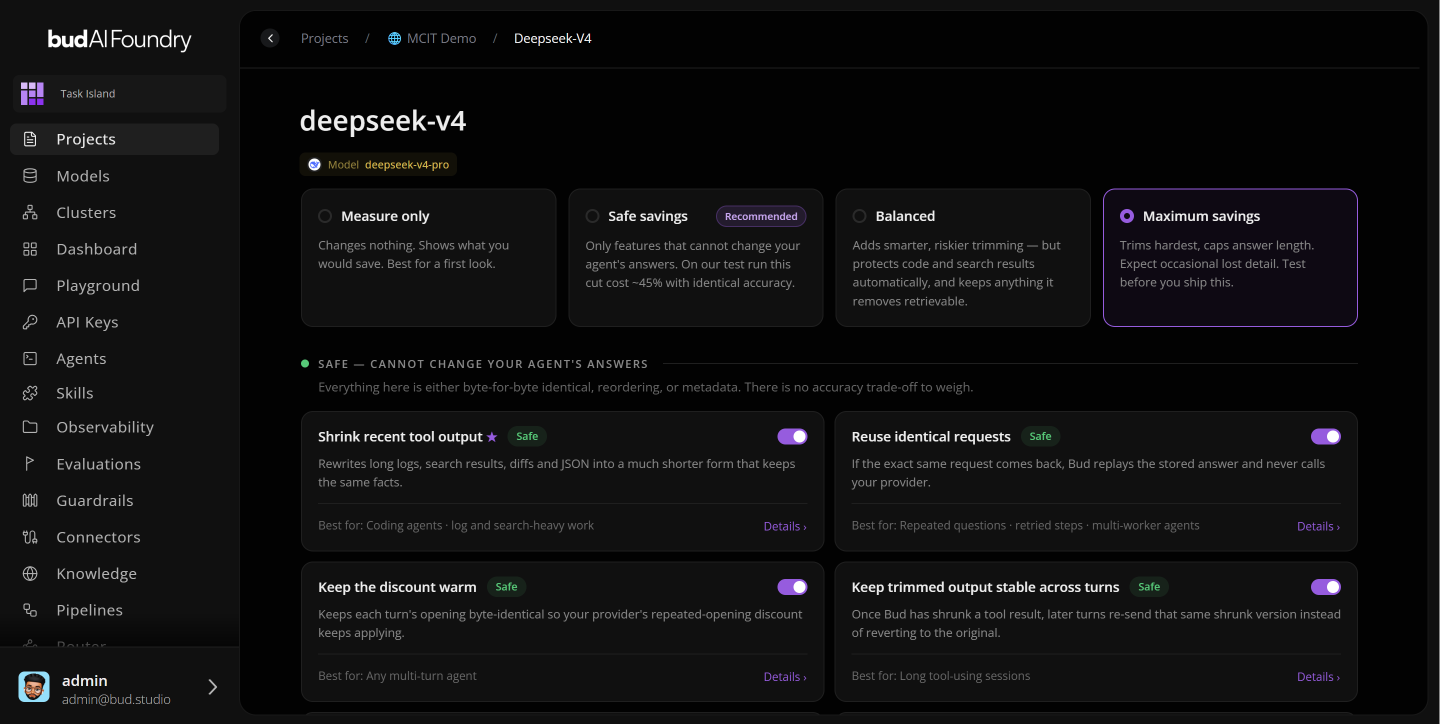
| Preset | What it does | Trade-off |
|---|---|---|
| Measure only | Changes nothing. Shows what you would save. | None. The best first look at a live deployment. |
| Safe savings (recommended) | Only techniques that cannot change the agent's answers. | None on accuracy. About 45% lower cost on our test run. |
| Balanced | Adds smarter, riskier trimming. Protects code and search results automatically, and keeps anything it removes retrievable. | Larger savings, some risk to answers. |
| Maximum savings | Trims hardest and caps answer length. | Expect occasional lost detail. Test before you ship it. |
Table 1 — the four Cost Optimiser presets. The 45% figure is Bud's own test run; your saving depends on how repetitive and tool-heavy your traffic is, which is what Measure only is there to show.
Below the presets, every technique can be switched on or off on its own. They sit in two groups, and the split is the point: one group cannot change your agent's answers, the other can.
Safe: cannot change your agent's answers
Everything in this group is byte-for-byte identical content, a reordering, or metadata. There is no accuracy trade-off to weigh.
| Technique | What it does | Best for |
|---|---|---|
| Shrink recent tool output | Rewrites long logs, search results, diffs and JSON into a much shorter form that keeps the same facts. | Coding agents; log- and search-heavy work |
| Reuse identical requests | If the exact same request comes back, Bud replays the stored answer and never calls your provider. | Repeated questions, retried steps, multi-worker agents |
| Keep the discount warm | Keeps each turn's opening byte-identical, so the provider's repeated-prefix discount keeps applying. | Any multi-turn agent |
| Keep trimmed output stable across turns | Once a tool result has been shrunk, later turns resend the same shrunk version instead of reverting to the original. | Long tool-using sessions |
| Tighten tool output formatting | Strips pretty-printing from tool results. Same content, fewer tokens. | Any agent reading JSON |
| Fixed tool order | Lists your tools in the same order on every turn. | Any agent with tools |
| Tidy tool definitions | Sorts the keys inside tool schemas, so identical tools always serialize identically. | Any agent with tools |
Table 2 — the safe techniques. Keep the discount warm, stable trimmed output, fixed tool order and tidy tool definitions all hold the prefix steady between turns. On narrow screens the table scrolls sideways.
Careful: can change your agent's answers
Each technique in this group removes or limits something, and the tab shows the measured effect where one exists. They are kept apart so they are switched on deliberately, never by default.
- Trim long tool output. Either keeps the start and end of a long result, or cuts the middle and keeps the removed text retrievable. Best for huge grep and log output.
- Trim tool instructions. Shortens the descriptions attached to your tools: annotations, long text and, optionally, per-parameter explanations. Best for agents with very large tool schemas.
- Ask for shorter answers. Nudges the model to be less verbose. Best for chatty models and summarization.
Three protections apply across the group. Source code and search results are protected automatically. Anything removed stays retrievable. Time-sensitive answers are never cached. Even so, turn these on one at a time and watch what your agents return.
Run Measure only against a live deployment, and we will walk through what each preset would have saved, agent by agent.
Seeing the savings
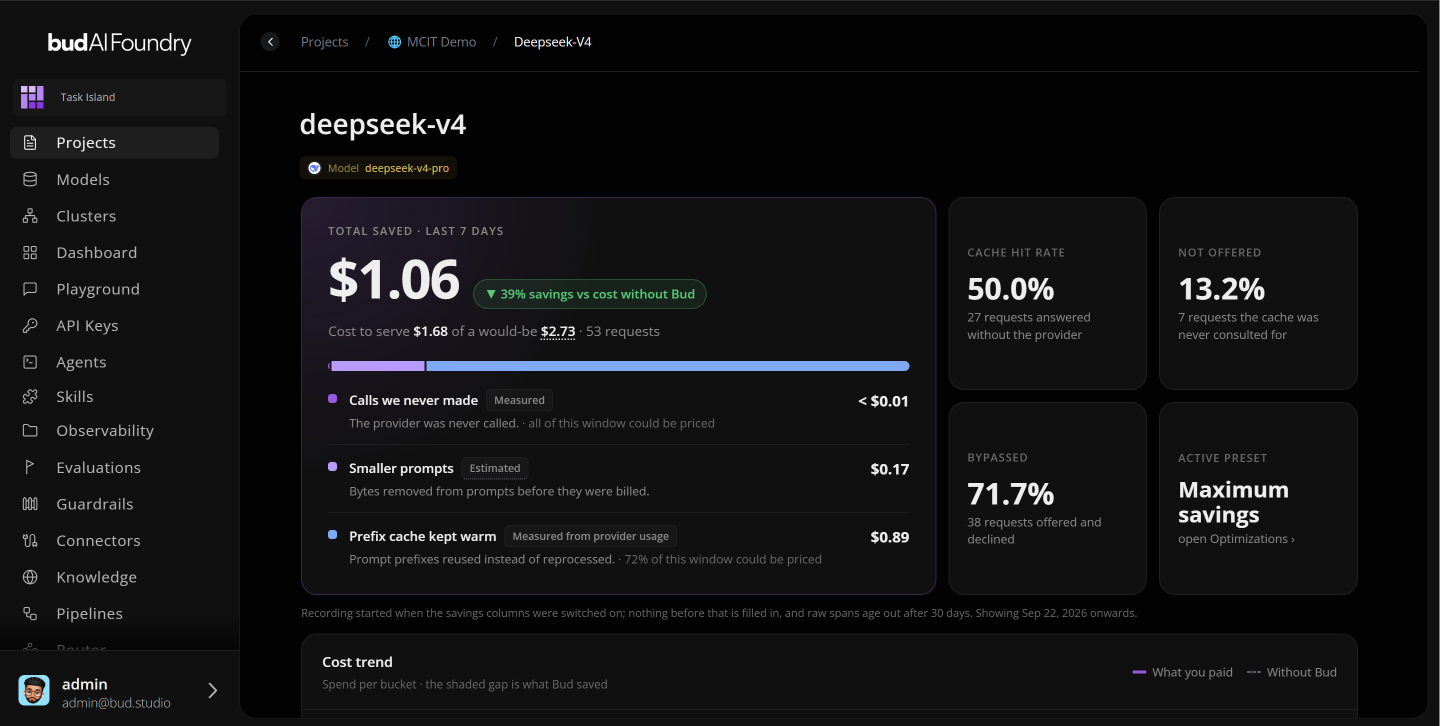
The Summary view reports how much has been saved and by which technique. Its cost trend chart sets what the deployment actually cost against what it would have cost with no optimization, so the gap between the two lines is the saving, over time. Below it sit the deployment's traffic, its cache hit rate, and how each request was handled: served from the cache, sent to the provider, or deliberately skipped. Savings also break down by agent, showing what each agent spent in the deployment and how much the cache saved it.
Three more tabs cover the operating detail.
- Cache. The requests and answers currently stored, with their size, expiry and status.
- Settings. How long answers stay cached, and the price basis for the deployment. With a price basis set, token counts are reported as money, so savings read in currency rather than tokens. Settings also lists techniques the platform applies by default. If ten workers send the same new request at the same moment, for example, Bud calls the provider once and returns that single answer to all ten.
- Activity Log. Every change to the Cost Optimiser, whether a preset switched, a rule adjusted or a setting changed, with who made it.
For a clean slate, the deployment's cache can be cleared. That deletes every stored answer for that deployment only; other deployments in the same project keep theirs.
A sensible rollout
- Start on Measure only. Let real traffic show what you would save before anything changes.
- Set the price basis. A saving in currency is something a budget owner can act on; a saving in tokens is not.
- Move to Safe savings. Nothing in it can change an answer, so there is no accuracy test to pass first.
- Add careful techniques one at a time. Watch what your agents return after each. Reach for Balanced or Maximum savings only where your evaluations show the application can absorb it.
- Agent cost is driven by repeated requests, oversized tool output and a broken prefix, not only by the number of questions asked.
- Safe savings uses only techniques that cannot change answers. On our test run it cut cost about 45% with identical accuracy.
- Four safe techniques exist to keep each turn's opening byte-identical, so the provider's repeated-prefix discount keeps applying.
- Techniques that can change answers are separate, protect code and search results, keep removed text retrievable, and go on one at a time.
- Every deployment reports actual against unoptimized cost, per agent, in money once a price basis is set, with a log of every change.