
DocsUser manual
Evaluate
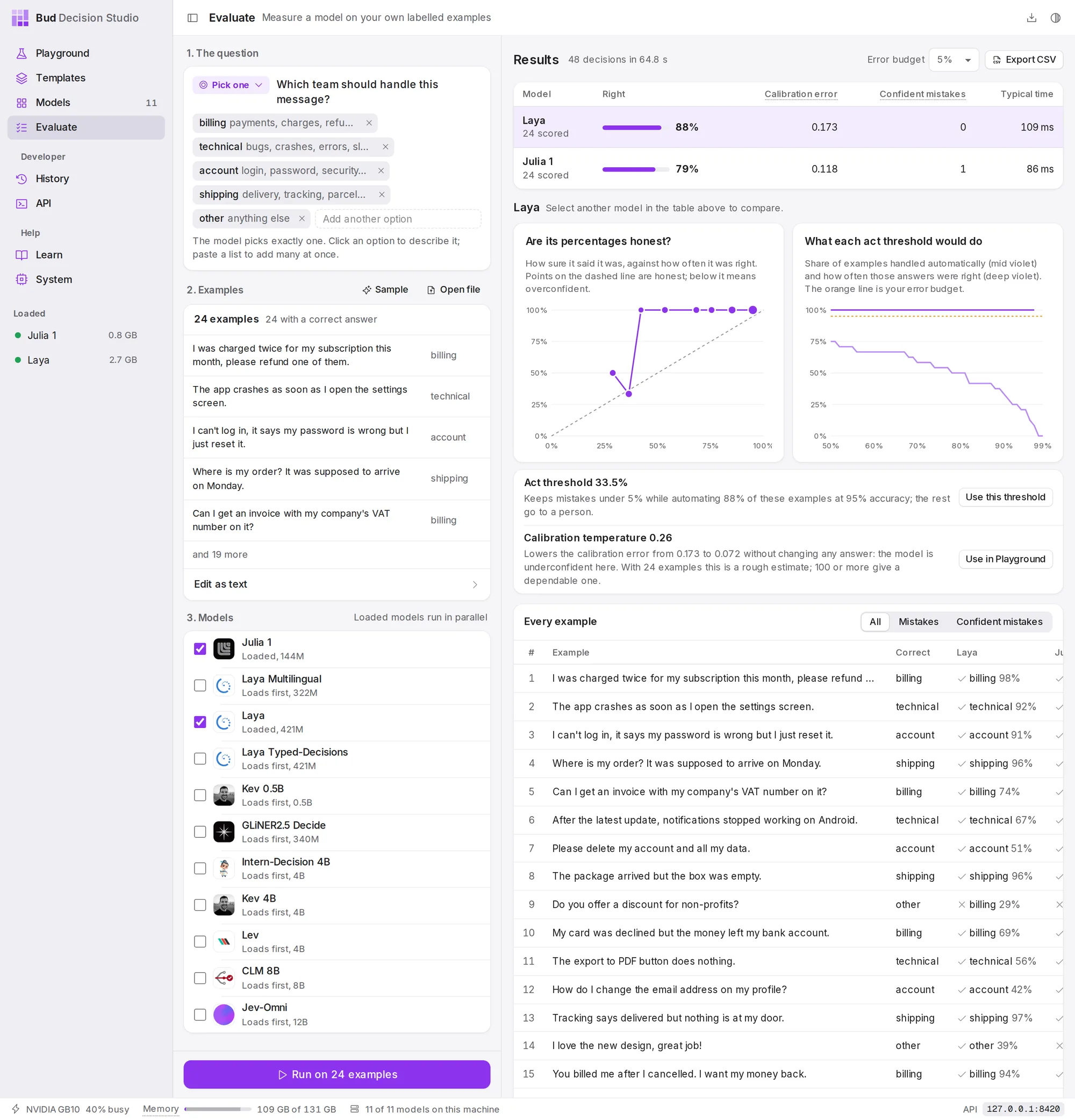
Evaluate runs one question over many labelled examples on several models at once. It shows how often each model is right, whether its percentages can be taken at face value, and which act threshold keeps mistakes under the limit you choose.
Why evaluate#
A model's published results are measured on someone else's data. Before you let it act on its own, measure it on yours: a few dozen real examples with the right answers tell you more than any benchmark. Evaluate answers three questions:
- How often is it right? Accuracy on your examples.
- Can its percentages be trusted? When it says 80%, is it right about 80% of the time? This is called calibration.
- Where should the act threshold be? The lowest threshold that keeps mistakes under your limit, and how much work that leaves for people.
Set up a run#
The left column has three steps.
1. The question. Write one question, as in the Playground. Evaluate takes Pick one, Rate on a scale and Yes or no questions.
2. Examples. One example per line, with the right answer after it. Sample loads 24 support messages, each labelled with the team that should handle it. Open file reads a file from your computer; Edit as text shows the examples as text you can edit or paste into. Three formats are accepted:
One example per line, then a tab, then the right answer:
I was charged twice for my subscription this month, please refund one of them. billingThe app crashes as soon as I open the settings screen. technicalA header row with a text column and a label column (answer or correct also work):
text,label"I was charged twice for my subscription this month, please refund one of them.",billing"The app crashes as soon as I open the settings screen.",technicalOne JSON object per line, with text (or state) and label (or answer):
{"text": "I was charged twice for my subscription this month, please refund one of them.", "label": "billing"}{"text": "The app crashes as soon as I open the settings screen.", "label": "technical"}Right answers are matched to the question's options without regard to capital letters. For a scale, give the level's name or its number (0 is the lowest); for yes or no, give yes or no (true, false, 1 and 0 work too). An answer that matches no option is not scored, and the studio says how many there were. Answers are optional: without them you still get every model's answers, but no accuracy. A run takes up to 2,000 examples.
3. Models. Tick the models to compare. Loaded models are ticked for you and run in parallel; a model that is not loaded says Loads first and loads when the run starts.
Choose Run on 24 examples (the button counts your examples).
Read the results#
The table ranks the models:
| Column | Means |
|---|---|
| Right | the share of scored examples the model answered correctly |
| Calibration error | how far its stated certainty is from how often it is actually right, on average. Lower is better; 0 is perfectly honest. |
| Confident mistakes | answers given with 90% or more that were wrong: the most dangerous kind of mistake |
| Typical time | the median time per decision |
While the run is going, the table fills in live and a bar shows the progress. Choose a model in the table to see its charts and recommendations below.
Are its percentages honest? plots how sure the model said it was against how often it was right. Points on the dashed diagonal are honest; points below it mean the model is overconfident, above it underconfident. Bigger points stand for more examples.
What each act threshold would do plots, for every threshold from 50% to 99%, the share of examples the model would handle on its own and how often those answers were right. The orange line is your error budget.
Use the recommendations#
Under the charts, Evaluate recommends two settings for the selected model.
Act threshold. The lowest threshold at which the answers the model acts on are wrong less often than your Error budget (1%, 2%, 5%, 10% or 20%; 5% by default), with how many examples that automates and at what accuracy. Use this threshold makes it the Playground's act threshold. The recommendation stays within 50% to 99%, the range of the Playground's slider and of the chart. If even the most confident answers are wrong too often, it says No safe threshold: send these decisions to a person, or try another model. If fewer than three examples reach 50% certainty, it says Not sure enough to act: the model is not wrong, it is never sure, so describe the options more clearly or try another model. (Versions before 0.3.0 could recommend a threshold below 50%, which the slider cannot show.)
Calibration temperature. One number that makes the model's probabilities honest without changing any answer. Above 1 means the model was overconfident; below 1, underconfident. Use in Playground applies it to the Playground's decisions. If no temperature would help, it says so and recommends keeping the model's own numbers.
Check every example#
Every example lists each example, its right answer and each model's answer with its probability, marked right or wrong. Mistakes shows only the examples some model got wrong; Confident mistakes only those answered wrongly with 90% or more. The table shows the first 400 rows.
Export CSV downloads every example with each model's answer and probability, as bud-decision-results.csv.
Notes#
- Evaluate remembers your question and examples in this window.
- Every decision a run makes is kept in History, marked Evaluate, so you can open any of them later. The Playground's Keep this decision in History switch does not apply here; to keep nothing from a run, set What History keeps to Nothing in History's settings first.
- To check a template against its own test examples, or two versions of a template against each other on real decisions, use the Templates page.