


InferencePlayground
Write a situation, ask typed questions and read every answer as a chart, in about 100 ms on a GPU. Images, audio and video work too.
How a decision works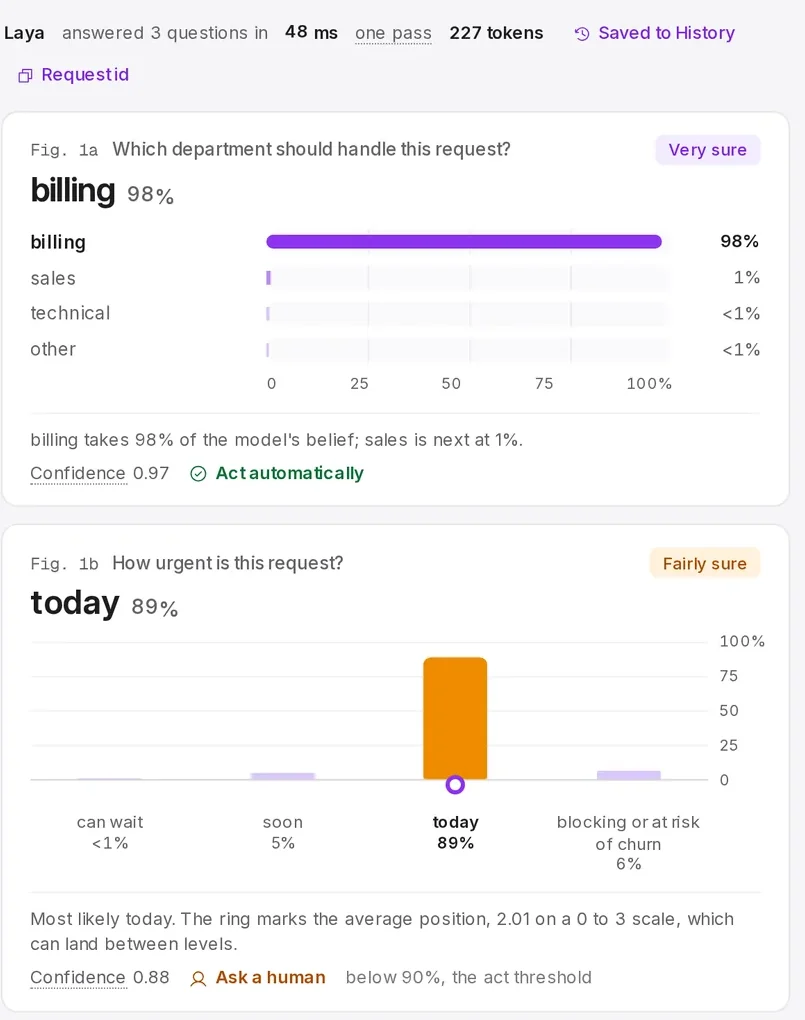
Learn, infer, serve, train and integrate Jev-like decision models on your own hardware, with no setup.
support-triagev2supportinjectionmoderationtoolverifyemailSupport triage
Route inbound tickets, rate urgency, flag churn risk.
The situation
customer_messagetext, up to 8,000 charactersaccount_tier optionalone of free, pro, enterpriseopen_invoices optionalwhole numberUse it from code
curl http://127.0.0.1:8420/v1/studio/decisions \
  -d '{"template": "support-triage",
       "variables": {"customer_message": "..."}}'
Laya got better
Laya for support tickets
correct on 126 questions it had never seen, up from 76%
On general decisions it already knew, it scores 49% (49% before), so nothing was forgotten.
Hi there, In Keystone, my account shows the wrong manager. This stops us closing the month today.
It learned from 588 answered questions and was tested on 126 it never saw, in 10 min.
Real answers from Intern-Decision 4B and a real training run on an NVIDIA GB10, replayed. Timings are the model's own.
Eleven open models from eight makers
Your code can't act on a paragraph. A decision model reads a situation and returns the probability of each answer you allowed, so your software gets a number it can act on.
Hi, we were billed twice for March on invoice #4411. Please refund the duplicate today or we will cancel our plan.Which department should handle this?
A paragraph to parse, and no way to tell how sure it was.
98 ms, one pass. A probability for every option you allowed, and nothing else.
You list the options. The model can't reply with anything else, so every output is something your code already handles.
The situation is read once and every option of every question is scored together, in about 100 ms on a GPU.
These models are trained to be calibrated: at 90% they should be right about nine times in ten. Evaluate checks that on your own examples.
Learn what they are, run them, serve them to your code, teach them your own decisions and watch every answer they give, all on your computer.
Write a situation, ask typed questions and read every answer as a chart, in about 100 ms on a GPU. Images, audio and video work too.
How a decision worksA local server that speaks TypeSafe's Jev API, OpenRouter and Vercel AI Gateway. Point existing code at it and change nothing else.
See the API# One local server, four formats POST /v1/systemone TypeSafe Jev POST /api/v1/systemone OpenRouter POST /typesafe/v1/systemone Vercel AI Gateway POST /v1/studio/decisions Studio, with templates base_url = "http://127.0.0.1:8420"
Eleven open models with their size, memory and published results next to Jev. Download, load and eject each with one click.
Browse the models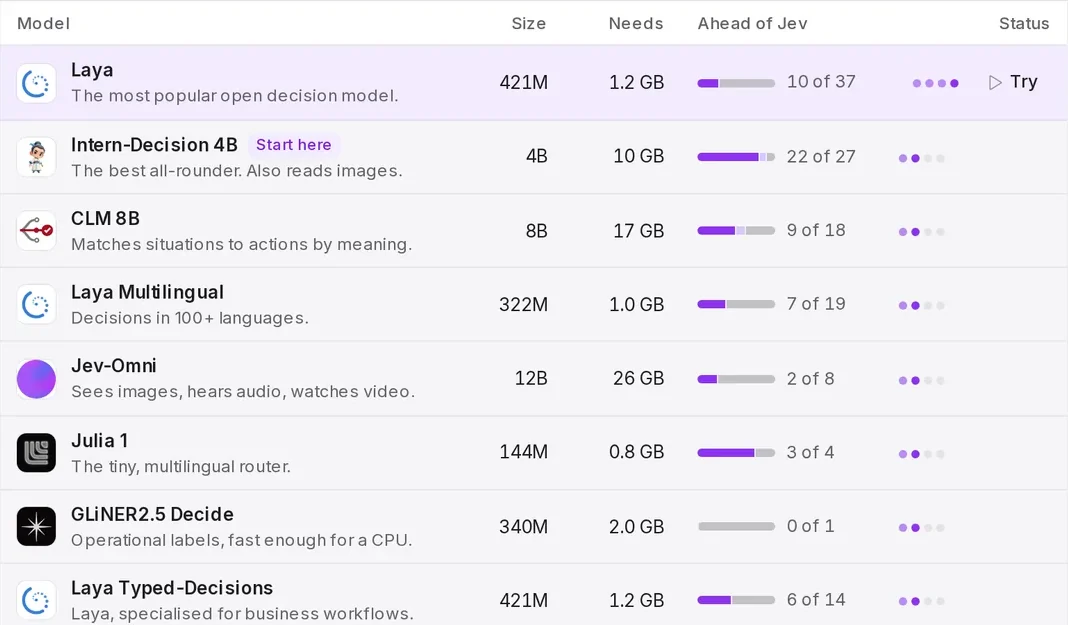
Save a decision as a versioned template with variables, test it on examples and call it by name from your code.
How templates work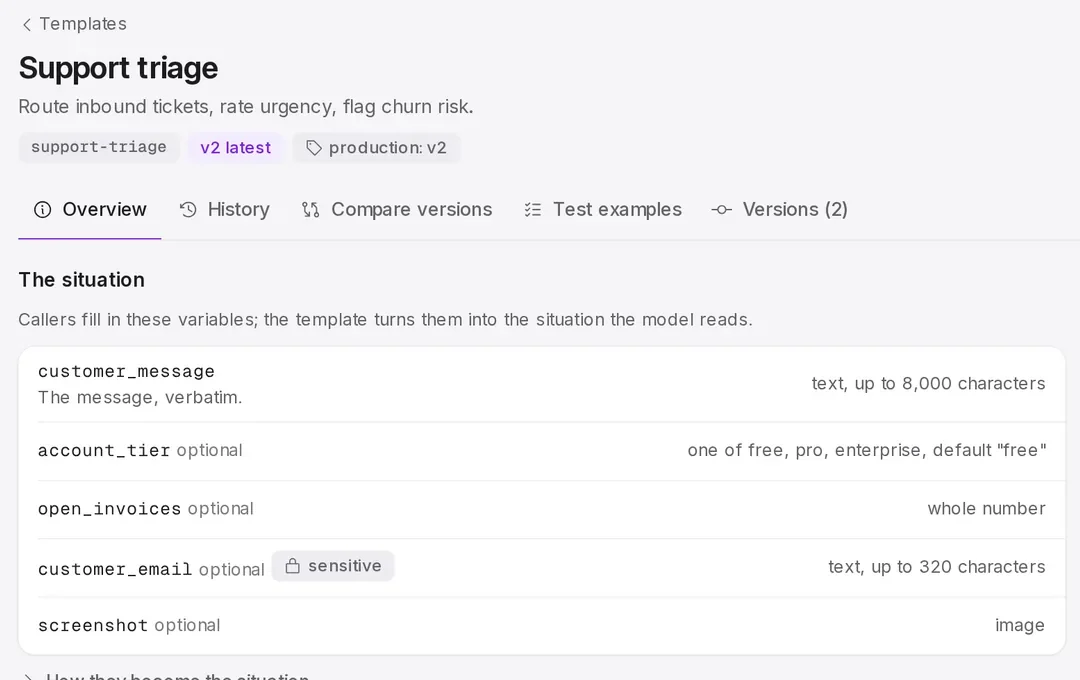
Teach a model your own decisions from a spreadsheet. It is kept only if it gets better without forgetting.
See the results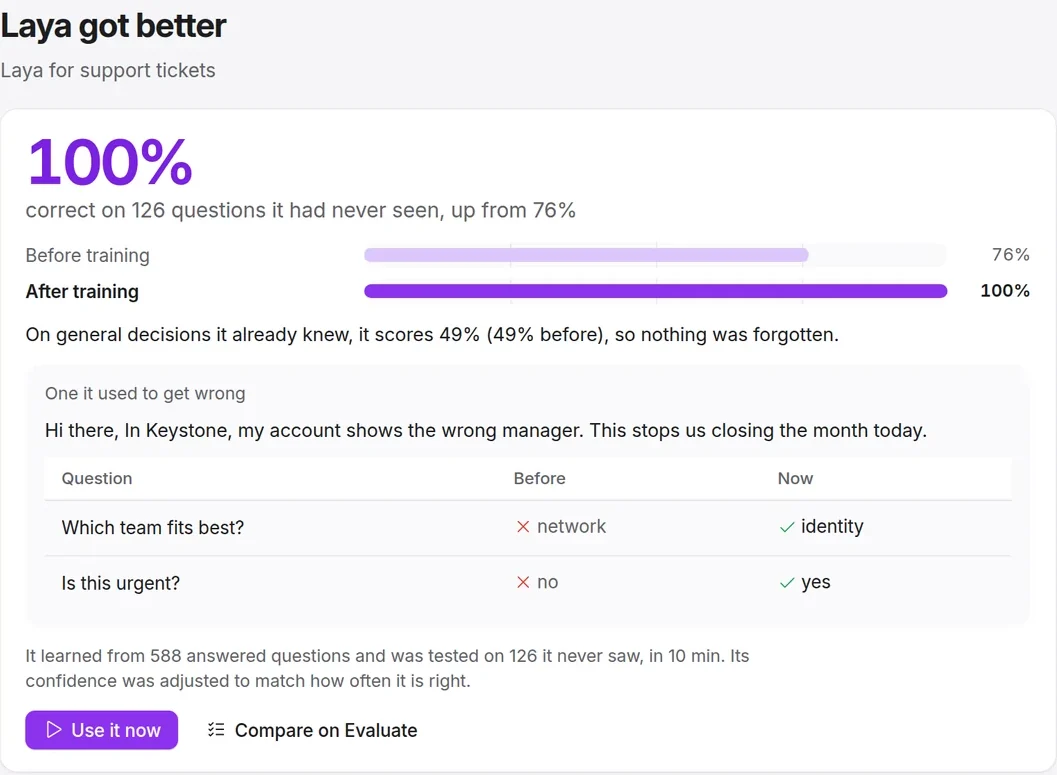
Every decision from the app, your code and any SDK, with what acted automatically and what asked a person.
How History works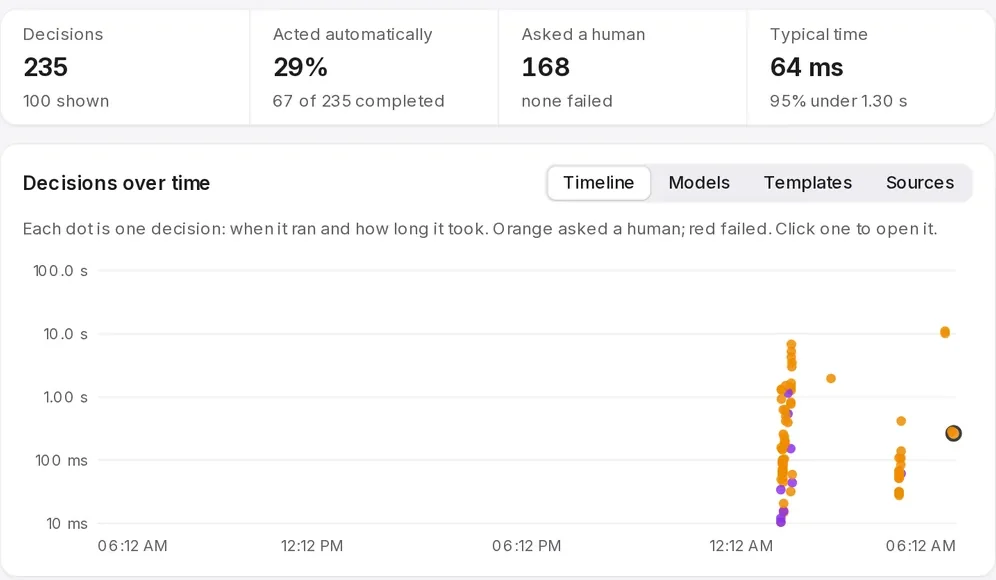
Score several models on your own labelled examples, with calibration and act-threshold charts and a recommendation.
How Evaluate works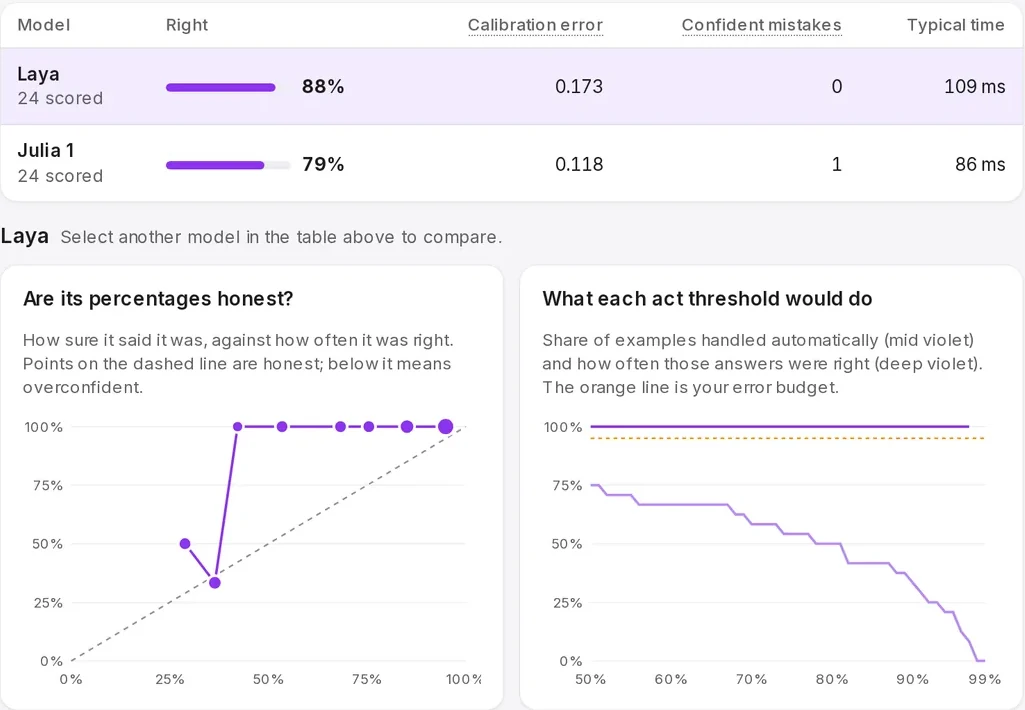
A guide inside the app that explains decision models with live examples, from the first question to your own training.
Read the docsThe Playground is where every model starts. Write what happened, ask what you need to know, and read each answer as a chart.
An email, a support ticket, a log line, a JSON object. Intern-Decision 4B also reads images, and Jev-Omni reads images, audio and video.
Choose from six kinds of question and list the answers you'll accept. Several questions can share one situation.
The model reads everything once and scores every option at the same time. There is no text to generate and nothing to parse.
Pick a threshold. Answers at or above it are safe to act on automatically; the rest go to a human. Drag it to see what changes.
Decision models answer three natively; the studio builds the other three from them. Every answer comes back as a full distribution.
Figures 2a to 2f show the shape of each answer with example values.
Try a model, compare it with others, measure it on your own examples, teach it your own decisions, save it as a template and review every decision it makes, without leaving the app.
The studio is a desktop app with a local server inside. This is the path every request takes, and all of it stays on your computer.
Call it a thousand times or a million. The cost is the electricity.
127.0.0.1:8420It listens on this computer only. Other websites can't call it, and History keeps every decision for you to review.
Ejecting a model ends its process and frees every byte. A crash in one model can't take down the studio.
Once a model is downloaded it needs no connection. Fonts and assets ship inside the app.
The only thing that comes in: model downloads from Hugging Face, one at a time, smallest first, into the cache your other tools already share.
What never leaves: your situations, your questions and every answer.
Weights come straight from each maker's Hugging Face repository. Nothing downloads until you choose; on first run, two that suit your computer are ticked for you.
Results are each maker's own published numbers, compared with TypeSafe's Jev where the maker reports one. Each model keeps its own license; its page in the app links to it.
Show a model a spreadsheet of past decisions. The studio trains it on your GPU, tests it on examples it never saw, and keeps it only if it got better without forgetting what it already knew.
A column of text and a column per answer. The studio works out the questions and recommends a model with a time estimate.
It practises on general decisions as it learns yours, and every new model must pass the same checks before you can use it.
A trained model is a small file beside the original: it loads in the Playground and your code, and exports to another computer.
The first time it opens, the studio checks your graphics, processor, memory and free disk, asks where models should run, and installs the matching engine inside its own folder.
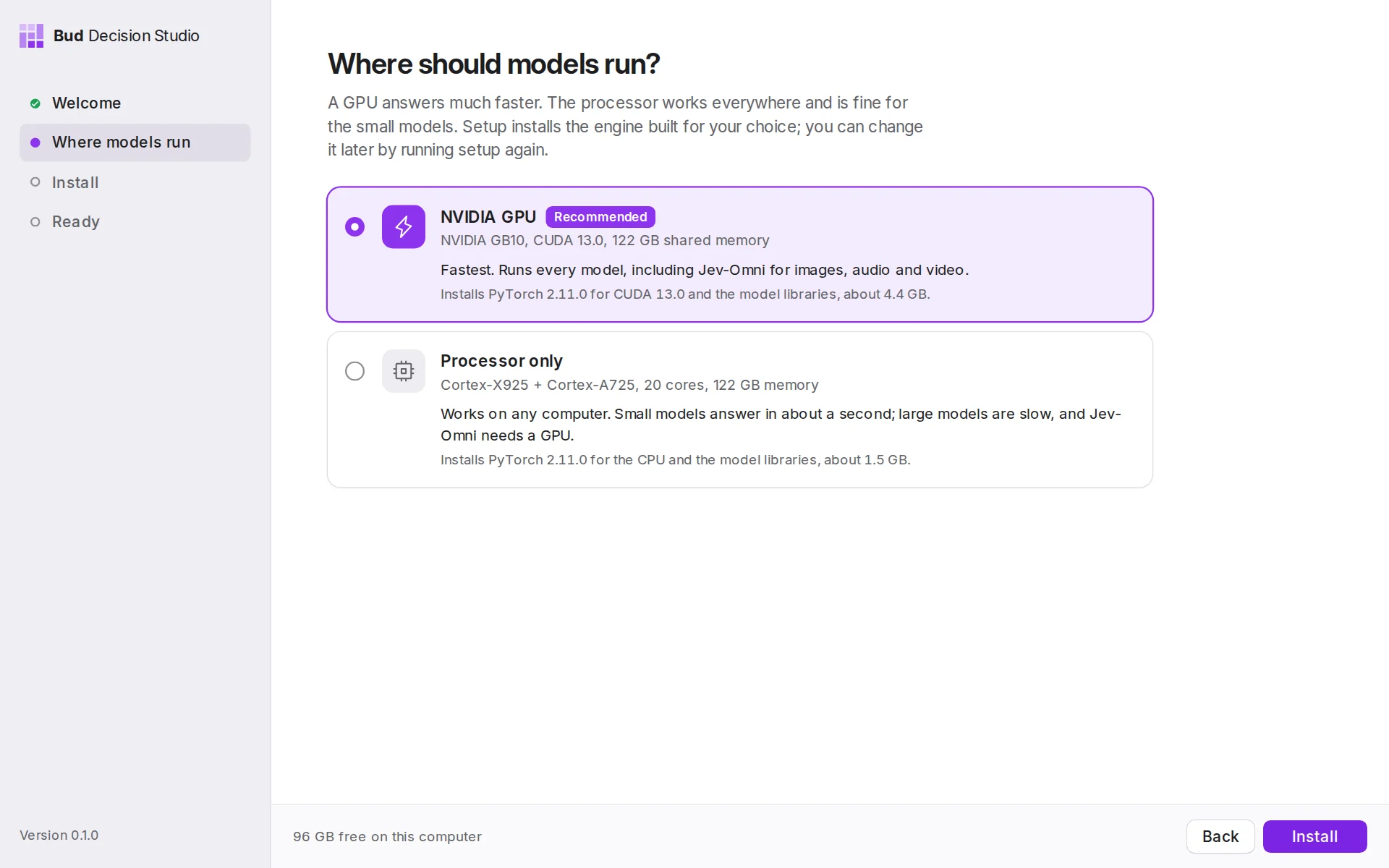
GeForce, RTX, GB10 and DGX Spark, data-centre cards
CUDA 12.6, 12.8 or 13.0, picked from your driverM1 or newer, macOS 12.3 or later
The Apple GPU, through MetalLaptops and desktops with Arc graphics
The Intel GPU (XPU)Radeon and Instinct cards
ROCm, experimentalNo GPU needed
The processor; small models answer in about a secondWhile the app is open, the studio serves TypeSafe's Jev API at 127.0.0.1:8420. The official SDKs and code written for Jev work unchanged, with any of the eleven models.
POST /v1/studio/decisions/v1/studio/templatesRun a saved template with new details. Every decision is kept in History, and templates keep their versions.POST /v1/systemoneGET /v1/modelsThe official typesafe-sdk and @typesafe-ai/sdk work as they are.POST /api/alpha/decisionsPOST /api/v1/systemonePOST /typesafe/v1/systemoneGET /typesafe/v1/modelsPOST /v1/evaluateEvery endpoint also takes the pick-any, put-in-order and estimate-a-number questions, images, audio and video in "media", and a calibration temperature. Send X-Basal-Extensions: 1 to get each answer's decision, probabilities and latency too.
API referenceCall the studio from your codeMove from Jev
Tested against TypeSafe's published schema, both official SDKs and OpenRouter's schema: 14 of 14 checks pass. End to end, all six question types on all eleven models: 21 of 21.
The app is small. The engine and the models you choose download on first run, matched to your hardware.
Pick a download from the list below.
curl -fsSL https://raw.githubusercontent.com/BudEcosystem/Bud-Decision-Engine/main/get.sh | sh
Downloads the right build, installs it and opens the app.
Something else? Open an issue on GitHub.
A model that returns probabilities instead of text. You give it a situation, such as an email, a log line or a JSON object, and typed questions with the answers you allow. It returns the probability of each answer in one fast pass. TypeSafe's Jev made the idea popular; the studio runs open models built in the same spirit, often called "System One" models.
No. Every model except Jev-Omni runs on the processor, and the small ones (Julia 1, Laya, GLiNER2.5 Decide) answer in about a second. A GPU makes the 4B and 8B models fast: on an NVIDIA GB10, Intern-Decision 4B answers three questions in about 100 ms.
Yes, on a computer with an NVIDIA RTX 30 series or newer GPU (including the GB10) or an Apple M2 or newer; Intel Arc, AMD on Linux and older cards are an experimental option. Give the Train page a spreadsheet of past decisions: it trains the model on this computer, tests it on examples it never saw, and keeps it only if it got better without getting worse at general decisions. How it works.
Your situations, questions and answers don't. The internet is used to download the engine during setup and the models you choose, from each maker's Hugging Face repository.
Right-click the app and choose Open once. Or install with the one-line command, which avoids the warning.
Choose More info, then Run anyway. The one-line PowerShell command avoids the warning.
It usually needs more memory. Eject other models from the sidebar or the System page. Each model's log is on its Models page, under View log.
Hugging Face limits anonymous downloads. Run hf auth login once and restart the app.
Yes, when you choose to. Start the server with --host 0.0.0.0 and set BASAL_API_KEY; clients then send Authorization: Bearer <key>. By default it only listens on the computer it runs on.
In the standard Hugging Face cache, shared with your other tools. A model you already downloaded elsewhere won't be downloaded twice.
Download the app, pick a model, press Decide.
Download Bud Decision Studio