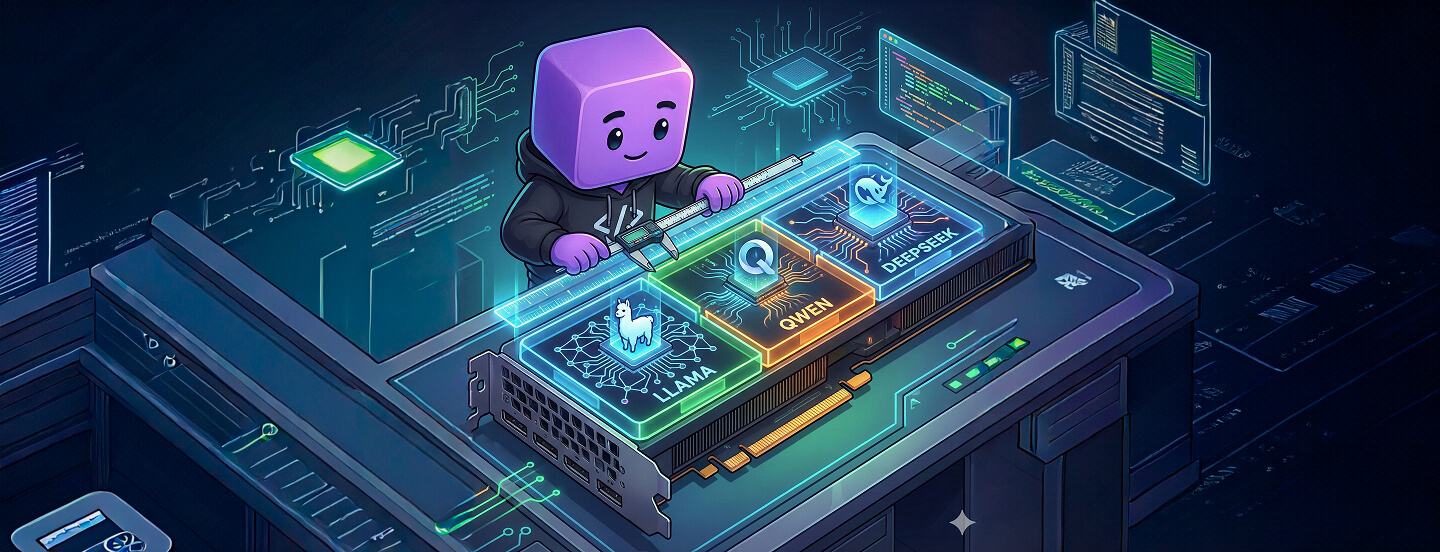
AI-in-a-Box appliances have become the preferred choice for enterprises that need GenAI running on-premises, inside air-gapped environments, or under strict physical control. But as organisations scale, they hit the same roadblock: each use case ends up needing its own system, every model appears to require its own GPU, and every new idea from another team prompts another hardware purchase.
What begins as a clean, contained solution gradually turns into an ever-growing stack of isolated, single-purpose machines. Under the hood these boxes don't usually have a performance problem — they have a utilisation problem. GPUs sit partially idle while IT teams are told, "we need another box."
Hard capacity ceilings
Every appliance ships with a fixed number of GPUs. Without hardware virtualization, one GPU runs one model — or supports one team, or one use case. The remaining capacity is rarely usable: extra VRAM or compute headroom exists as a "just in case" buffer, reserved for spikes. When a new major workload arrives, the only answer is another box.
So even if a single model uses 40–50% of its GPU's VRAM and compute most of the time, that GPU is effectively tied up. The unused portion is stranded. Take a Llama-3-8B model on an A100 40GB: in real enterprise settings that typically uses 20–30 GB of VRAM at 60–70% utilisation, with occasional spikes.
"Box per feature" sprawl
Every new capability — RAG, summarisation, vision, guardrails, embeddings — competes for GPU time. In a non-virtualised environment that leads directly to infrastructure sprawl. To keep workloads isolated and predictable, organisations add a dedicated appliance per function: one box for LLM inference, another for embeddings, another for vision. As different business units adopt AI they get their own boxes too — risk, customer experience, product, research — all running similar workloads on separate hardware. Staging environments often need their own appliances as well.
Despite the growing fleet, each appliance typically runs far below capacity. Large amounts of GPU compute and VRAM sit idle most of the time, yet the organisation pays the full cost: the hardware, the power and cooling, the operational overhead, and the physical space in racks or remote sites. Over time the gap between actual workload needs and infrastructure footprint becomes hard to justify.
Edge and remote site constraints
AI-in-a-Box is especially valuable at the edge — retail stores, factories, hospitals, branch offices — where local execution cuts latency and improves reliability. But these environments come with real constraints. Power and cooling are limited. Physical space is tightly controlled. Even where space exists, shipping, installing and configuring hardware at a remote site involves long lead times and operational friction.
In these locations you rarely have the luxury of adding GPUs when demand grows. Scaling has to come from using the hardware already in the box more efficiently.
What virtualisation has to deliver
To turn AI-in-a-Box from a fixed, single-purpose device into an elastic platform, three capabilities are essential:
- Strong isolation, so multiple models, tenants and environments can safely share a GPU without interfering with one another.
- Predictable performance, so latency and throughput SLOs hold even when workloads are bursty, diverse, or competing for the same hardware.
- Broad hardware compatibility across GPU vendors and generations, because appliances ship with different GPUs depending on tier, market and release cycle.
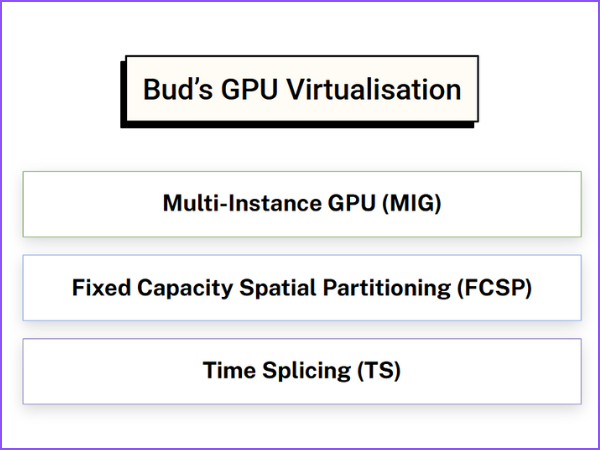
Bud AI Foundry delivers all three through a multi-layer engine. Where the hardware supports it, the platform uses hardware partitioning such as MIG. On mid-tier and commodity GPUs it uses Fixed Capacity Spatial Partitioning (FCSP) to carve the device into isolated slices. On legacy hardware it falls back to intelligent time-slicing that maintains fairness while still driving utilisation. The mechanics of all three are covered in the heterogeneous virtualisation post; what follows is what they mean for an appliance specifically.
From single box to virtual GPU fabric
In a traditional setup, the orchestrator sees physical devices: fixed, indivisible units each running one major workload. Bud's virtualisation presents the same hardware as a flexible pool of virtual GPUs, each with its own VRAM quota, compute allocation and performance guarantees. These vGPUs appear to Kubernetes as independent, schedulable resources governed by specific SLOs.
That shifts the mental model. Instead of "I have two GPUs," you think in capacity: "I have eight vGPUs sized for LLM workloads, four tuned for vision, and four for embeddings or guardrails — all on the same physical box."
Premium SKUs: hardware partitioning
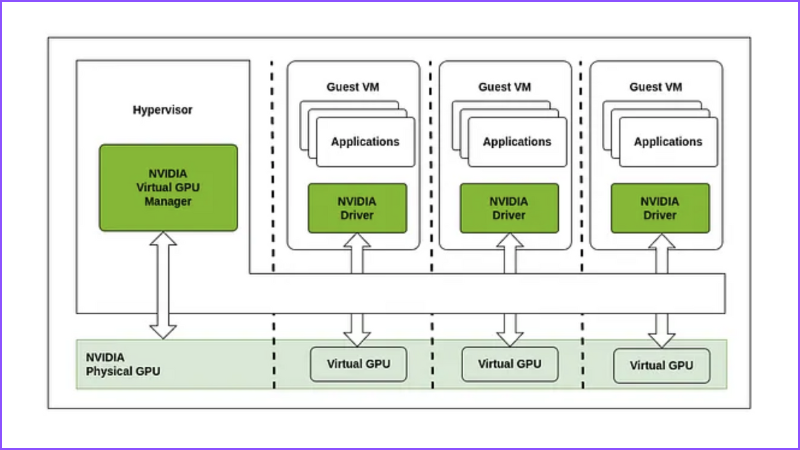
For appliances shipping with data centre GPUs, MIG carves the card into hardware-enforced instances, each with a dedicated VRAM partition, a fixed share of compute and internal bandwidth, and isolation at the firmware level. In an appliance that translates directly: one slice for the primary LLM, one or more for embeddings and RAG, one for guardrails or safety models, one for staging and canary deployments — all on the same card, with near-zero overhead.
Mainstream and edge boxes: FCSP
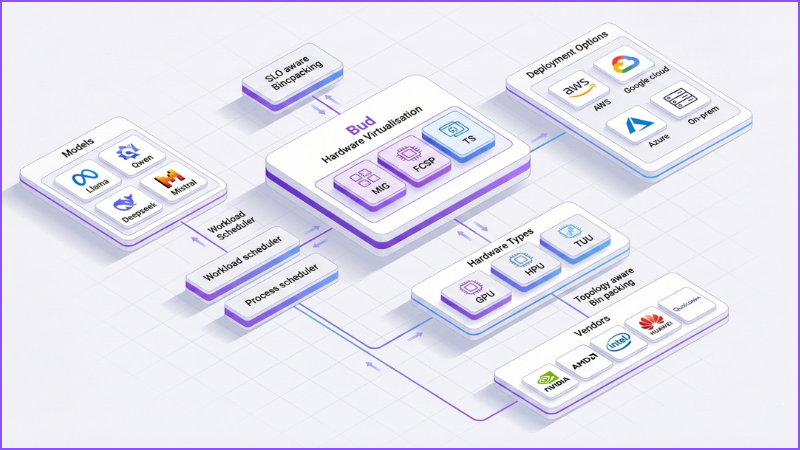
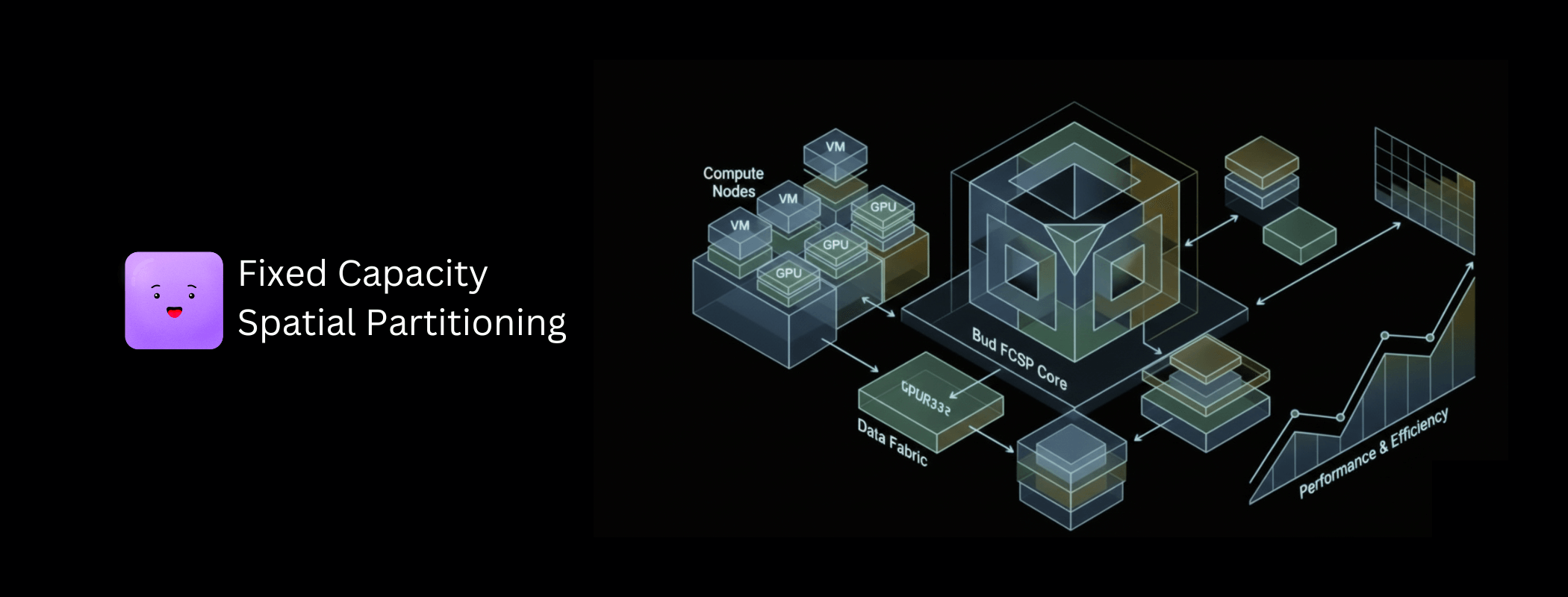
Most appliance SKUs don't ship with top-end data centre cards. They use mid-range, cost-optimised or commodity GPUs, often with no hardware partitioning at all. FCSP slices those in software: each vGPU gets a fixed VRAM budget and compute share, behaves like a separate card to the runtime, and a noisy or buggy workload can saturate its own slice without taking down neighbours.
Behind that, SLO-aware binpacking profiles each workload by model size, VRAM footprint, concurrency and latency expectation, then arranges workloads into slices to avoid collisions. Process-level scheduling controls which kernels run, when, and for how long, enforcing execution windows and preempting when necessary. And topology awareness means the system understands how GPUs, CPUs, PCIe roots and NVLink are physically connected inside the box, placing workloads to minimise hops and bus contention.
Legacy fleets: time-slicing
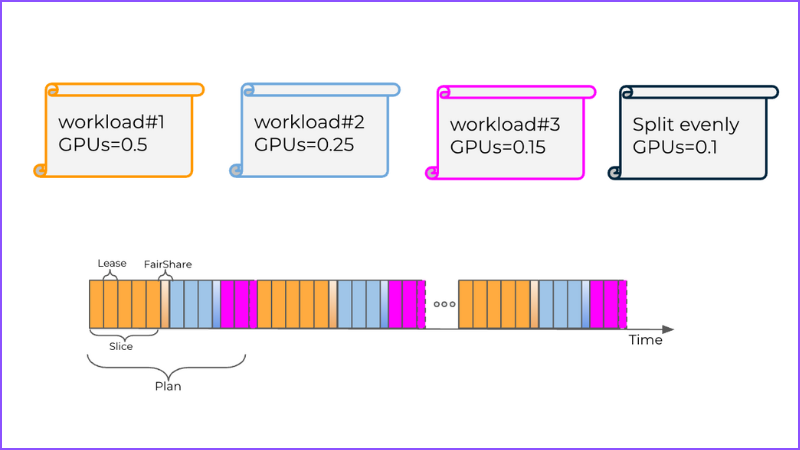
Where GPUs support neither MIG nor FCSP-style slicing, workloads share a memory space while the scheduler rapidly switches context between them, with execution windows tightly controlled so no single workload blocks the others. It doesn't offer hard isolation — but it enables genuine multi-model operation on GPUs that could previously run only one model, bringing fairness across competing workloads and unlocking usable capacity from older hardware.
For OEMs and customers with large existing fleets that matters commercially: instead of replacing or expanding hardware, you upgrade the software stack and immediately gain better utilisation and support for more complex workloads.
A 30-minute walkthrough on your hardware mix, governance constraints, and top use case.
What this unlocks
Many models, one box
Rather than dedicating an entire GPU — or an entire appliance — to one workload, you can co-locate many. LLMs run alongside summarisation and agent workflows, embedding models handle retrieval in parallel, vision models process document or camera feeds, and guardrail or policy models operate continuously in the background. Even analytics pipelines, logging and GPU-accelerated sidecars share the same box. Each runs in its own slice with defined VRAM limits, predictable compute shares, and independent rate limits and SLOs.
Shared appliances across teams and tenants
One appliance can serve multiple business units without separate boxes per team. Managed service providers can allocate slices to different customers, while running production and shadow traffic on the same device. Because vGPUs are exposed as schedulable Kubernetes resources, platform teams can assign per-team quotas, apply SLO and priority policies per slice, and implement chargeback based on actual consumption.
Higher density, fewer boxes
Converting idle VRAM and compute into usable slices packs more capability onto each appliance, reducing the number of boxes per site and often delaying or eliminating further hardware purchases. For edge-heavy organisations — retail chains, logistics, telcos, healthcare — that means fewer truck rolls, a smaller power and cooling footprint per location, and simpler SKU management.
Faster iteration without new hardware
New models launch in small pilot slices without consuming a whole GPU. Canary and shadow deployments run alongside production. Upgraded versions get tested without rearranging hardware. When a use case proves out, the slice is resized rather than a box ordered.
What changes for OEMs
- Richer SKUs without changing hardware. Offer fractional GPU plans — an eighth, a quarter, a half — so customers pay for what they need. Combine LLM, RAG, vision and guardrails into a single appliance SKU. Add premium SLO tiers backed by guaranteed isolation and SLO-aware scheduling.
- Better yield across the fleet. Higher workload density per appliance, more consistent utilisation across mixed GPU generations, and analytics that show where capacity is being wasted or contended.
- Simpler lifecycle management. New virtualisation and optimisation features ship as software updates rather than hardware refreshes, and heterogeneous GPU lineups sit under a single abstraction so operations stay consistent regardless of the underlying vendor.
What changes for customers
- Cost and utilisation. Idle capacity becomes actively used virtual GPUs, reducing the appliance count per site and extending refresh cycles.
- Reliability and SLOs. Slice-level caps protect critical workloads from noisy neighbours. P95 latency can stay close to a dedicated GPU even on shared hardware, and the risk of outages from stray OOM events or runaway kernels drops.
- Agility. New use cases launch without waiting on procurement. The same appliance supports more models, more tenants, and more experimentation at once.
Common questions
Will virtualisation hurt latency?
Not if it is done correctly. Allocation is SLO-aware, sized on model size, concurrency and latency requirements. On premium GPUs, hardware MIG partitions give near bare-metal performance. On mid-range and legacy cards, FCSP and time-slicing are tuned to protect critical workloads, so P95 stays close to dedicated performance while utilisation rises. P99 is the figure to watch — it typically grows under contention.
Can I run multiple business units on one appliance safely?
Yes. vGPUs behave as strongly isolated lanes on the same hardware: each unit or customer gets dedicated slices with fixed quotas, noisy workloads in one slice cannot starve critical workloads in another, and platform teams enforce per-tenant policies and SLOs with usage-based chargeback.
Do I need the newest GPUs for this to work?
No — that is the point of the three-layer approach. High-end cards use MIG, mainstream and edge-friendly cards use FCSP, and older cards fall back to time-slicing. You get virtualisation benefits from hardware you already own.
What changes for my platform team?
They get a more cloud-like experience on-prem. GPUs appear as vGPU resources in Kubernetes, assignable per namespace, team or application like any other quota. They set SLOs and priorities — production above staging above experiments — and get observability into utilisation, contention and waste across the fleet.
How do I know whether I need this?
You are a strong candidate if GPUs are underutilised but you still feel capacity-constrained; if you are considering buying boxes to support new use cases or teams; if you operate many edge locations where adding hardware is painful; if you need to serve multiple business units with strong isolation on shared appliances; or if your platform team wants cloud-like control over on-prem GPUs. Two or more of those, and virtualisation will likely pay for itself.
- "One box per feature" is a utilisation symptom — the GPUs in the fleet are mostly idle.
- At the edge you cannot add hardware, so scaling has to come from the box you already shipped.
- Exposing vGPUs as schedulable resources turns a fixed appliance into a multi-tenant platform.
The Llama-3-8B utilisation profile and the 30% idle-capacity figure are typical observed ranges from enterprise deployments, not a controlled study. The $183K–$259K monthly figure is a worked illustration: 10 H100 nodes at $85–$120 per node-hour running continuously, with 30% of that spend attributable to idle capacity — substitute your own pricing, utilisation and duty cycle before using it in a business case. Fractional SKU tiers and per-slice sizing describe platform capability, not a published price list.